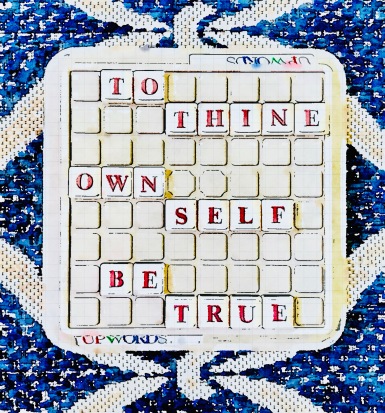
TGIF: I Answer Jill’s Questions Over There While Announcing Summer Hours Here

~ ~ ~ ~

THE JILL’S QUESTIONS OVER THERE PART

Jill Weatherholt asks questions, oh yes she does.

In fact she asked me to answer her questions, so I did.

Should you care to read my answers to her questions then click on I WANT TO READ ALLY BEAN’S ANSWERS TO JILL’S QUESTIONS and you’ll be magically taken over there to her blog.

Forsooth.

THE SUMMER HOURS HERE PART

Wanna know a secret, my gentle readers? Yes? Well then lean in closer and I’ll tell you one.

When I chose SIMPLIFY as my word of the year I planned on taking this summer off from blogging.  Just bug out completely.  Detach entirely.

However plans change.  Perhaps you, too, live in a state where you are still being asked to stay at home?  Well, we do and we are.

This is the end of Week 13, by the way.

Now clearly I have the time to post to this blog, but summer [in the northern hemisphere] is when I’ve found that personal blogging slows down to a dribble.  Plus I’m in a blogging rut, in the mood for a change, a simplification as it were.

Thus I’ve decided to adopt what I’m calling SUMMER HOURS.  To wit:

  • I’ll be posting my usual flapdoodle and twaddle here every other week instead of weekly.
  • I’ll be posting mid-morning, probably on Tuesdays, thereby allowing me to have a relaxed morning in keeping with summer’s mellow vibe.
  • I’ll be commenting less frequently on your blogs, keeping up weekly with the cool kids who keep up with me.

And with that I wish y’all a groovy weekend and a happy summer.  I’ll be here when I’m here.

LOVE ‘YA. Mean it.

A Fun Project: Getting Freaky With A Couple Of Jigsaw Puzzles

These are pictures of how each finished puzzle is supposed to look.

• • •

Jigsaw puzzles are suddenly popular. We have a stash of them so for snorts & giggles we mixed two of them together to create two unique masterpieces. Here’s how we did it.  

• • •

1. Find two puzzles with the same number of pieces that were cut using the same machine. Just because two puzzles are from the same company and have the same number of pieces doesn’t mean they have the same shape pieces. Lesson learned hard way on this point. 

It’s all about the details when you decide how to merge the puzzles.

2. Put together one of the puzzles then put together the other puzzle beside the first puzzle. Stare at the puzzles until your eyes cross you see an interesting way to mix the images in each puzzle. This takes imagination, but you can do it;  time is your friend.

This is an action shot as we began the methodical mixing of the pieces.

3. Carefully begin the process of extracting the pieces that form one image in the first puzzle, setting these pieces aside on a flat surface like a baking sheet, then extract the same area from the second puzzle. This requires patience and a steady hand.

Our first masterpiece called: Hot Air Balloons Landing On Giant Folded Quilts

4. Put pieces from the first puzzle into the empty space created in the second puzzle. Continue this mixing of the pieces until you’ve created your own unique puzzle that makes you smile. If you’re not smiling at this point you’re doing this wrong. 

Our second Masterpiece called: Giant Quilts Covering Hot Air Balloons In Sky

5. Photograph your masterpieces, pat yourself on the back, then deconstruct your puzzles, keeping track of which pieces belong in each box. Congratulations, you’re officially a jigsaw puzzle artist nonpareil.

• • •

Your turn. Whatcha been doing for snorts & giggles? What else should we be doing with all this free time? Please share your ideas in the comments below.

• • •

#ThursdayDoors | Visiting A Rose Garden, Finding Some Pithinicity

Today I’m joining Thursday Doors, hosted by Norm Frampton, so that I can share with you photos of the following doors plus a little more.

~ ~  ~ ~

A few weeks ago Zen-Den and I had the chance to stop by the Columbus Ohio Park of Roses again. [Click HERE for post about previous visit and information about this park.]

Entrance sign.

It was a beautiful summer day but the garden was not at its rosy best like the last time we were there.  I snapped a few pics anyhow, ostensibly to be part of this project.

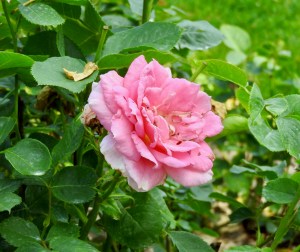
A pink rose not in its prime.

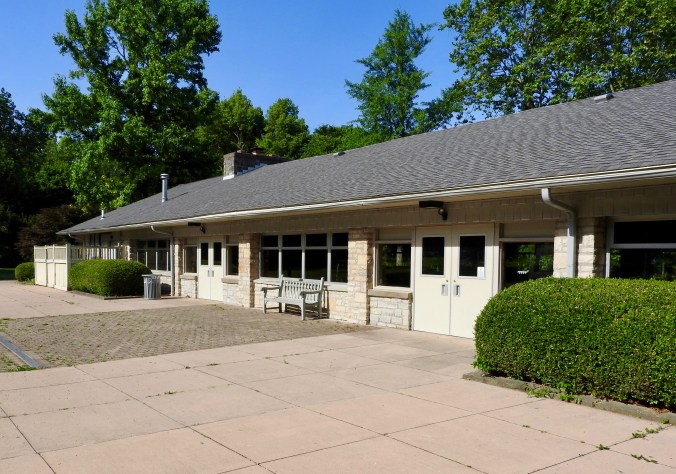
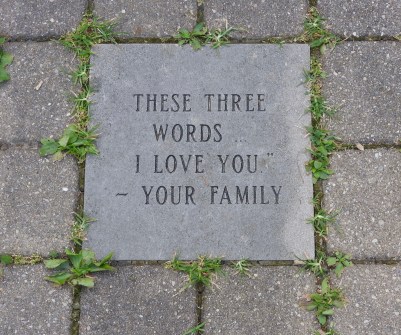
While the doors we saw were more utilitarian than awe-inspiring, the carved stones in the walking path that connect the Shelter House [event venue] to the park itself were eclectic.

Gazebo in center of park.

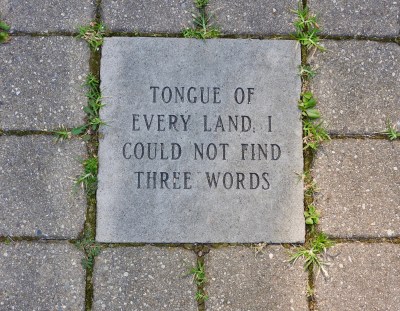
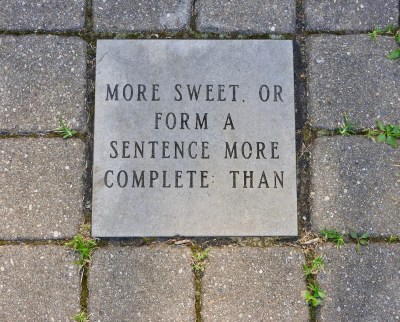
I hadn’t noticed the messages on the stones during our previous visit.  So below, for the heck of it, are two photos of the doors we saw and the pithinicity on which we walked.

~ • ~

DOORS on side of Shelter House looking into the park.

~ • ~

“HAD I ALL LANGUAGE AT COMMAND AND SPOKE THE [1 of 4]

~ • ~

TONGUE OF EVERY LAND, I COULD NOT FIND THREE WORDS [2 of 4]

~ • ~

MORE SWEET OR FORM A SENTENCE MORE COMPLETE: THAN [3 of 4]

~ • ~

THESE THREE WORDS I LOVE YOU.” ~ YOUR FAMILY [4 of 4]

~ • ~

DOOR on side of Shelter House leading into Bridal Room. [Doesn’t this door look ominous to you? It does to me.]

~ ~ ~ ~

This Is How I Make 2 Types Of Images For My Blog

Have you ever heard someone say that their mantra is to always be recommending?  I love that idea.  Information is part of what makes the world go round.  

To wit, here’s what I use to make 2 types of unique images that I share on The Spectacled Bean. I’m often asked about where I get my images, so here you go.  

~ ~ 🌟 ~ ~

WHEN I TURN PERSONAL PHOTOS INTO ART I use a free app called Waterlogue.  It’s on my phone, ezpz to use, and offers a variety of looks.  Here’s an example of a before and after image.

First I took a photo with my phone.  This is that photo.

Then I used the app choosing one of their filters, in this case the Illustrator, to make my photo look snazzy.  This is the after.

As you can see the app has taken a so-so photo and turned it into a bombdiggity blog-worthy picture.

~ ~ 🌟 ~ ~

WHEN I CREATE IMAGES WITH TEXT I use Canva on my desktop computer [or here for your phone].  It’s a graphic design website [or an app for your phone] featuring a variety of free templates, many pre-sized for any social media you might use.

First I picked a template.  This is the before.

Then I did a fast little rewrite using the first movie quote that came to mind, thus creating something clever and unique.  This is the after.

In this example I did a color change & resized the font but there were many free and $$$ options I could have used to make this image even more amazeballs.

~ ~ 🌟 ~ ~

I hope that this information is of some value to you.  

If you know of other ways to create blog post images [preferably free] please recommend them in the comments below.

And on that note, with nothing more to say here, I shall wish all of you Happy Blogging.